

THE PRACTICAL CONTRACTOR WEBSITE GUIDE
A practical guide to
contractor website
design.
A guide to general contractor website design: what to show, how to organise it, and when to build it yourself or bring in help.
By Goliath Marketing
Selected Goliath website projects
Real websites for construction and home-service businesses, with Relianzi Constructions taking the lead.
START WITH THE DECISION
What does a good contractor website need to explain?
Before choosing colours or a homepage layout, write down what a prospective customer needs to know. Do you handle whole-home renovations, manage additions, provide design services, or deliver a specific part of the construction? Those are different offers. Your site should make the distinction clear.
For planned residential work, visitors need to understand the work you accept, where you work, and whether your experience is relevant to their plans. They also need an obvious way to contact you, without feeling they must arrive with a complete construction brief.
The starting test: could a homeowner tell someone else what your business does after looking at your homepage, one service page and one project record?
Use this guide for considered projects such as renovations and additions. Commercial tendering, specialist trades and emergency repairs may need different proof, detail and contact priorities. Do not add those audiences simply to make your service list longer.
EXPLORE THE DESIGN
Three useful contractor website layout ideas.
Different starting points suit different businesses. The examples below are original, schematic layouts rather than screenshots of real client sites. Each explains a choice you can apply to your own content.
Find the right service
Renovations
Additions
What’s included
Scope + service area
See related work
Projects that match
Discuss your project
PATTERN A / SERVICE-LED
Help visitors find the work they need.
A short introduction leads to distinct services, then related projects. This works when your services differ enough that a visitor needs help choosing a route.
Watch for: a grid of vague labels that all lead to the same generic description. Explain what changes between services.
Prepare: actual scope, exclusions where helpful, service areas and relevant project material.Explore the work
Project story
The starting point
The contractor’s role
The finished work
Make the proof useful
Photos + clear captions
Explore this service
PATTERN B / PROJECT-LED
Give the photograph a useful explanation.
Lead with approved work and a concise account of the brief, your role and the completed scope. Link to the matching service so visitors can move from inspiration to relevance.
Watch for: beautiful images that never explain who did what—or imply you delivered work handled by others.
Prepare: permission to use images, accurate records and captions that add context.Start a conversation
Your contact details
How should we reply?
About your project
Type · Area · Stage
Not sure yet? That’s OK.
Know what happens next
PATTERN C / ENQUIRY-LED
Make the first conversation less vague.
Explain what to send and what happens after contact. Ask about project type, general area and planning stage, while allowing uncertainty.
Watch for: a long form that demands detailed drawings or a firm budget before someone has spoken to your team.
Prepare: your actual follow-up process, routing responsibilities and privacy requirements.Explore our live construction and home-service client websites:
Relianzi ConstructionsBright Green Roof CalgarySwift Lawn & GardenINSIDE THREE GOLIATH CLIENT WEBSITES
Three websites. Three design decisions worth borrowing.
See how our construction and home-service client websites balance imagery, service information and the next step.
CONSTRUCTION
Relianzi Constructions: make the work the focal point
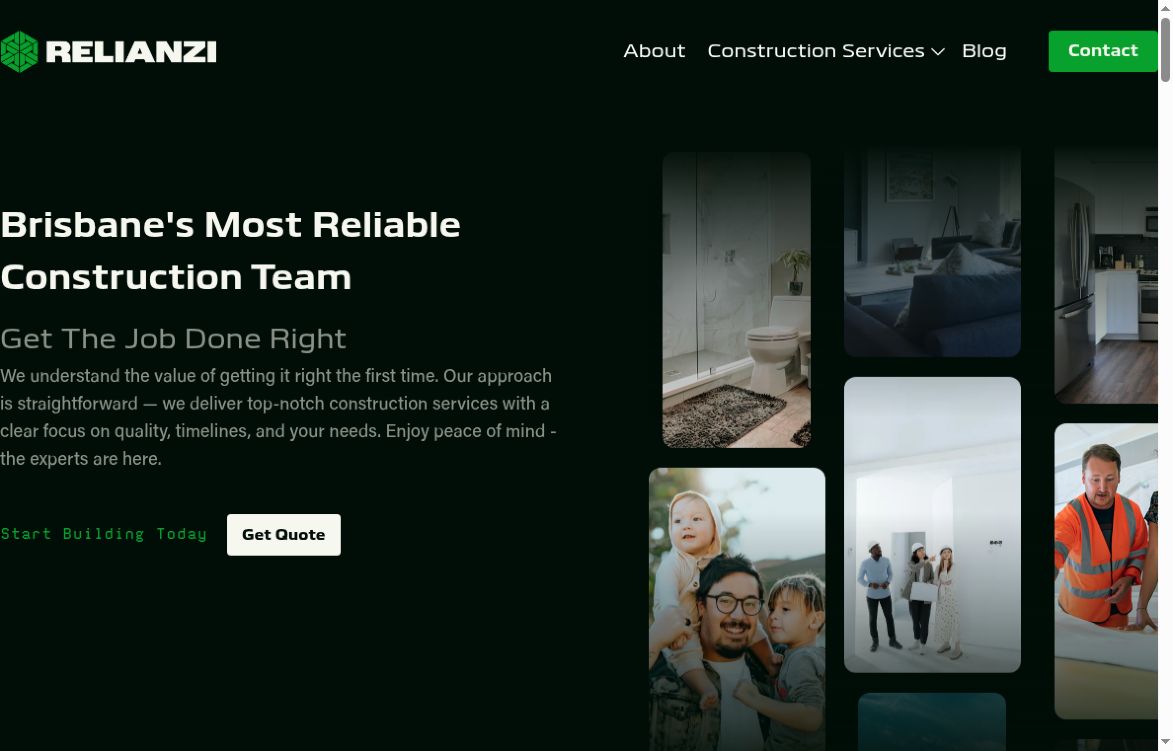
Relianzi pairs a deep-green background with large white headings and a collage of residential spaces. The first screen names Brisbane and construction, then gives the visitor a clear quote action. That combination makes the service, location and next step easy to find without competing with the imagery.
The image-led layout suits a business where the finished environment matters. The collage adds visual variety while the restrained palette keeps the page feeling like one brand. A separate Construction Services menu gives people a route into the kind of work they are considering.
Apply it to your website
Use a strong, specific opening statement beside relevant work. Keep the main enquiry action distinct from the service navigation so visitors can either explore or get in touch.
ROOF REJUVENATION
Bright Green Roof Calgary: put the service and contact choices up front
Bright Green Roof Calgary uses teal, lime and white to create a clear visual hierarchy. The hero names roof rejuvenation, with a prominent enquiry button beside a visual introduction to the business. The site also gives visitors a phone route in the top banner.
The navigation separates learning about the service from taking action: visitors can explore how it works, request a quote or use the roof-measurement route. That is a useful distinction for a service that customers may need to understand before they are ready to discuss their property.
Apply it to your website
When your service needs explanation, provide a clear learning path alongside the contact path. Label each action by what the visitor can actually do next.
LAWN AND GARDEN CARE
Swift Lawn & Garden: connect the service to the people doing it
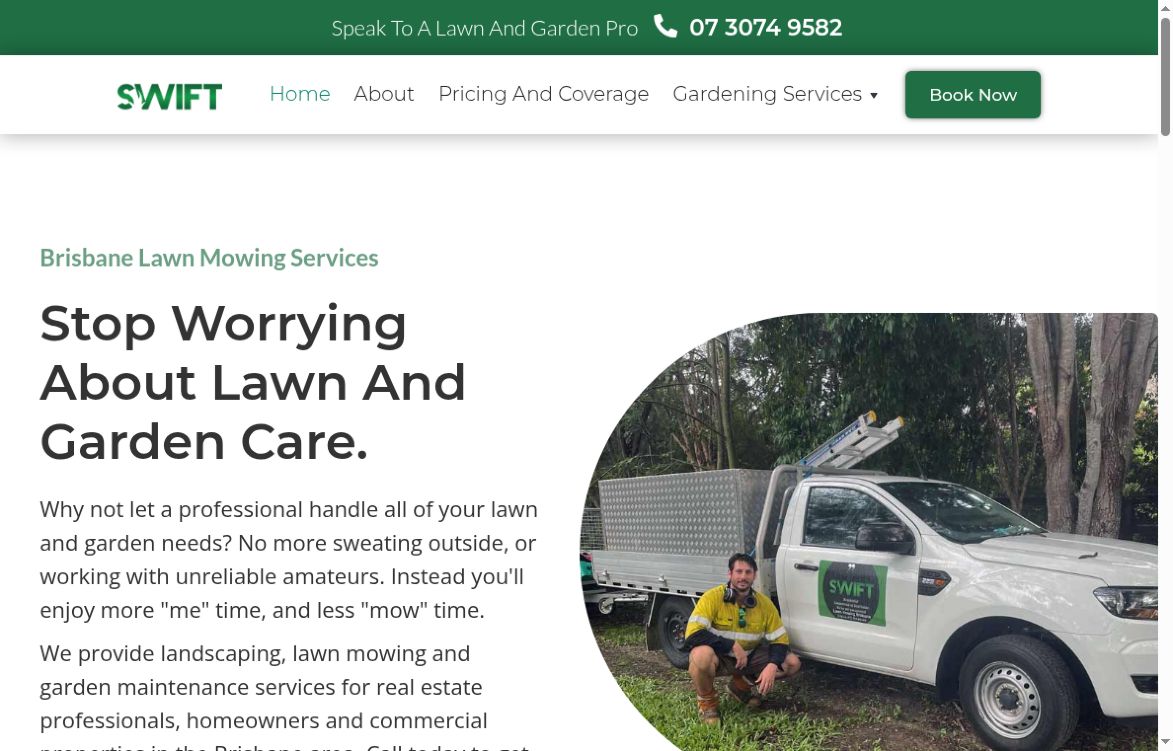
Swift leads with Brisbane lawn mowing, a plain-language headline and a photograph of a team member beside a branded vehicle. Green accents and generous white space make the service message easy to scan. The image brings the people behind the work into the first screen.
The header keeps practical decisions close together: a telephone number, Book Now, Gardening Services, and Pricing and Coverage. Visitors can check what is offered, whether the service fits their area, and how to start without hunting through unrelated pages.
Apply it to your website
Pair a precise service-and-location message with recognisable team or project photography. Make service details, coverage and the next contact step easy to reach.
ORGANISE THE INFORMATION
A practical page map—not a page-count target.
A small site with clear, useful pages is a sensible starting point. Give a topic its own page when the visitor’s questions and the available evidence are meaningfully different, not because a package includes a certain number of pages.
Homepage→Relevant service→Related project→Contact
| Page | Question it answers | What to prepare |
|---|---|---|
| Homepage | Is this the kind of contractor I need? | A plain explanation of services, actual service area, selected relevant work and a contact route. |
| Service | What does this work involve? | Scope, important distinctions, questions customers ask and links to relevant completed work. |
| Project | What experience can I examine? | The starting point, your role, documented constraints, approved images and completed scope. |
| About | Who would I be working with? | Accurate team information and credentials you can support. Do not imply affiliations or accreditations you do not hold. |
| Contact | How do we start a conversation? | Useful contact details, a short enquiry route and realistic next steps. |
Location pages should add real information about work in the area. Swapping a place name into otherwise identical text does little to help a homeowner. Likewise, a blog is not automatically essential: first make the core service and project information useful and maintainable.
TURN THE MAP INTO A PAGE
What goes where on the homepage and service pages?
The order should remove uncertainty. Start by helping visitors recognise the business, then show relevant work and make the next step understandable.
01 / What you do + where02 / Routes to real services03 / Relevant approved work04 / People + supported credentials05 / Clear next stepA CLEAR SERVICE-PAGE STRUCTURE
- Opening: use a plain service description and real coverage, not a slogan that could belong to any business.
- Services: help people choose the appropriate scope. Do not force them to interpret internal trade language.
- Evidence: show relevant work with captions and accurate contributions; link to a fuller record.
- Trust: identify real people and current, verifiable credentials. Attribute reviews accurately and do not imply endorsements you do not have.
- Action: explain what to send and where the enquiry goes. Keep it consistent with your capacity to respond.
Give a service page a narrower job.
Explain the actual service and meaningful exclusions, describe your real working approach, show related project evidence and answer the questions that commonly arise before contact. Use an approved process rather than borrowing another contractor’s sequence. A project link should explain why that example is relevant, not merely say “view gallery.”
For commercial or specialist work, reassess this sequence. A procurement team may need different capability evidence and document routes; an urgent repair enquiry may prioritise contact availability. Those needs are outside this residential guide, not extra services to claim.
DOCUMENT THE WORK
Build a project page a homeowner can actually use.
A photo shows appearance. It does not establish your role, the agreed scope, the duration or the budget. Put those facts into words only when you have records and permission to use them.
- Starting point: identify the actual project type and the change the client wanted. Avoid unnecessary private details.
- Your role: distinguish construction management, your own team’s work, subcontractors and design contributions. Credit other contributors accurately.
- Important constraint: explain a documented condition that shaped the job, such as access or a retained feature. Choose a detail that helps someone understand the work.
- Work carried out: describe the agreed scope and significant decisions. Pair approved images with captions. Comparable before-and-after views can be useful if both are available and appropriate.
- Completed result: record what was delivered. Do not turn a photograph into an unsupported cost, schedule or satisfaction claim.
- Relevant next step: link to the service illustrated and invite a discussion of the homeowner’s plans. One completed project does not price the next one.
Make maintenance part of the workflow. Decide who collects project facts and photographs, who approves the record, and who adds it to the site. A reusable structure is only useful if someone can keep it current.
If you only have photographs, start with a short, accurate account of the work and your role. Do not invent a dramatic challenge or testimonial to fill the layout.
MAKE CONTACT STRAIGHTFORWARD
Ask enough to understand the enquiry.
A visitor might know what they want to change without knowing the budget, drawings or construction sequence. Your contact route should accommodate that stage rather than treating uncertainty as a failure.
- Ask for the project type and a short description.
- Ask for the general area rather than a full private address at first contact.
- Ask whether they are exploring ideas, preparing drawings or ready to discuss construction.
- Collect the contact information your team actually needs and the preferred way to reply.
If you ask about budget or timing, include an honest “not sure yet” option. Explain genuine requirements, but do not invent a minimum project value to make the business seem selective. Avoid requiring private drawings or detailed household information before an initial discussion.
Make the confirmation message match reality. Sending a form should not imply that an appointment, fixed quote or start date is confirmed. Provide an alternative contact route where appropriate, and decide who checks incoming enquiries.
CHOOSE THE RIGHT SIZE OF JOB
Build it yourself, improve it, or start again?
You do not automatically need a full agency project. Choose the scope by the work involved, your available time and who will maintain the site—not by how elaborate a competitor’s homepage looks.
A simple DIY presence
Consider this when you need a small number of clear pages, can supply accurate content and have time to learn and maintain your chosen editor. Keep the design simple and test the contact route.
A focused improvement
Consider this when the platform and editing tools work, but services, project records or contact steps are unclear. Improve those parts before committing to a rebuild.
A wider redesign
Consider this when navigation, content structure or editing limitations prevent the improvements you need. Plan migration, redirects, content and testing—not just visual changes.
Professional help becomes more useful when the work crosses content planning, design, migration, integrations and quality assurance. That does not mean every contractor needs automation, a complex project filter or a large article library.
AGREE THE RESPONSIBILITIES
What affects cost, timing and upkeep?
Two websites with the same page count can involve very different amounts of work. Ask what the proposal includes and who supplies each input. A price without those details is difficult to compare.
| Scope area | Question to resolve before work begins |
|---|---|
| Content & imagery | Who writes the copy, collects project records, obtains permissions and approves the final material? |
| Structure & editing | How are services and projects organised? Can your team add future work without rebuilding the layout? |
| Existing website | What needs to be retained or moved? Which existing addresses need redirects, and who verifies them? |
| Enquiries & integrations | Where do enquiries go? What connections are required, and who is responsible when they fail? |
| Ownership & ongoing costs | Who owns the domain and accounts? What hosting, platform or maintenance costs continue after launch? |
| Delivery & handoff | What are the review stages, dependencies, acceptance checks and training arrangements? |
Timing depends on agreed scope, access, content readiness and review decisions. Do not assume a competitor’s timeline applies to your site. Ask what can begin now, what needs your input and which changes would alter the schedule.
For Goliath’s current scope-dependent website range, see the contractor website design service. For a broader buying conversation, use these questions to ask a marketing agency.
MAKE USEFUL CONTENT FINDABLE
Search foundations without filler pages.
Give each page a distinct purpose, a descriptive title and a clear main heading. Use meaningful internal links so people can move between services and supporting projects. Keep business details accurate and avoid repeating nearly identical content under many place names.
During a rebuild, inventory existing addresses before changing them, plan appropriate redirects and check whether the intended public pages can be indexed. Check these essentials before launch, then keep them in your ongoing maintenance routine.
For the technical implementation, use Google’s SEO Starter Guide, rather than a recipe promising more leads from a particular number of pages. For an introductory accessibility review, W3C’s Easy Checks helps identify some problems; it is not a complete accessibility evaluation.
Keep the site useful after launch.
Assign someone to collect and approve new project records, update service coverage and credentials, check contact routing and retain access to the domain and platform. Review images for appropriate file sizes and avoid adding large autoplay media or third-party scripts without checking their effect on the actual site.
Separate three questions in measurement: are relevant visitors arriving, do suitable people enquire, and does the team follow up? Traffic, form counts and booked work are different observations. Record the limits before crediting a design change with a business result.
REVIEW BEFORE LAUNCH
A practical contractor website checklist.
Use this as a discussion checklist, not a certification or a substitute for a proper technical review. Test the actual pages and enquiry route, not just a desktop mockup.
- Clarity: can a new visitor identify the work you take on and the areas you genuinely serve?
- Evidence: are project roles, images, testimonials and credentials accurate and approved?
- Navigation: can visitors move from a service to relevant work and then to contact without hunting?
- Mobile: are text, menus, images and contact controls usable on a narrow screen without sideways scrolling?
- Keyboard access: can someone reach and operate navigation, disclosures and form controls with a visible focus indicator?
- Motion: is decorative motion restrained, and does the page respect reduced-motion preferences?
- Content access: do headings describe the structure, images have appropriate alternatives and form fields have clear labels?
- Contact: are required fields reasonable, errors understandable and the confirmation accurate? Arrange an authorised test of where submissions arrive.
- Migration: where applicable, are retained pages, redirects and important links checked?
- Handoff: does someone know how to update projects, manage accounts and resolve an enquiry-routing problem?
After launch, review relevant enquiries and how they were handled. Look beyond the enquiry count: which services were requested, did the projects fit your business, and did the visitor reach the right person?
COMMON QUESTIONS
A few things worth settling.
How many pages does a contractor website need?
Enough to explain the business, its distinct services, relevant work and contact route. Use the page map as a starting point, not a minimum package. Add pages when they answer different questions with useful evidence.
Can I use stock images?
Generic imagery must not be presented as your completed work. For a portfolio, use approved images of actual projects with accurate context. Check the rights for any image you use, including supplied photographs.
Should every project have a budget and timeline?
Only when the facts are supported, relevant and approved for publication. Explain what the figures cover and avoid suggesting one project establishes the price or timing of another.
Do I need a blog or a separate page for every town?
Not automatically. First make services, projects and contact useful. Add articles or location pages when you have meaningful information for those readers, not to fill a publishing schedule or repeat place names.
How should I judge whether the website is working?
Track enquiries by service type, location and project fit, then check how quickly your team responds. Compare the jobs you want with the conversations the website starts.
READY TO PUT THE GUIDE INTO PRACTICE?
See how a contractor
website project could fit.
Explore the design approach, scope questions and pricing
on the separate service page.



