01
Leads are waiting.
The phone rings while you are on a job. A form lands in an inbox. A good inquiry sits there because everyone is already busy.
Connect your first response
We build custom AI systems and connect the tools your business uses, so you can respond to leads, keep information moving and get on with the work that matters.
For small and medium-sized businesses. Built around your workflow, not the latest buzzword.
ONE CONNECTED WORKFLOW
Calls
A helpful first response
Texts
Keep the conversation moving
Web leads
Capture the useful details
Your CRM
The right record
Calendar + jobs
A clear next step
Your team
Context, not another mystery
G
Your rules.
Your workflow.
A FAMILIAR KIND OF BUSY
You do not need another dashboard to babysit. You need the right things to happen between the tools and people you already rely on.
01
The phone rings while you are on a job. A form lands in an inbox. A good inquiry sits there because everyone is already busy.
Connect your first response02
Booking changes, routine questions and reminders keep interrupting the people who could be helping customers.
Give your team breathing room03
The same customer details get copied into a CRM, a calendar and a job platform. The next step still depends on someone remembering.
Make the handoffs work01 / FROM INQUIRY TO NEXT STEP
Build a clear path from “someone is interested” to “the right person knows what to do next.” A speed-to-lead workflow can capture the details, send an appropriate first response and put the conversation where your team can act on it.
Outbound AI calls are a separate, consent-based workflow. Before launch, scope caller identification, channel permissions, opt-outs and any recording requirements.
THE REQUEST, IN ONE PLACE
Useful details captured. A clear next step.
01 / CAPTURE
Received
Service and contact details
02 / RESPOND
Prepared
An approved acknowledgement
03 / HAND OFF
Assigned
CRM record and follow-up task
A PERSON TAKES IT FROM HERE
An unusual pricing request?
Keep the original context. Send the decision to your team.
THE REQUEST
Check the agreed scheduling rules.
Take the permitted action.
Confirm the change or ask a person.
Your team stays in the loop.
Exceptions are part of the workflow, not an afterthought.
02 / A MORE USEFUL FRONT DESK
Give routine coordination a repeatable home. We can build AI receptionist and administrative workflows that help with scheduling, inbox routing, reminders and task creation, without pretending every decision should be automated.
When the request is unclear, a resource is unavailable or a change has consequences, the system needs a human next step. We define that boundary with you.
03 / CONNECT THE BACK OFFICE
The real value is often in the handoff. Connect supported CRM, booking and field-management tools so an approved business event can update the right records and kick off the next task, with less copying between screens.
AN AGREED EVENT
Customer record updated
Next task created
Eligible review request queued
One event. A connected set of next steps.
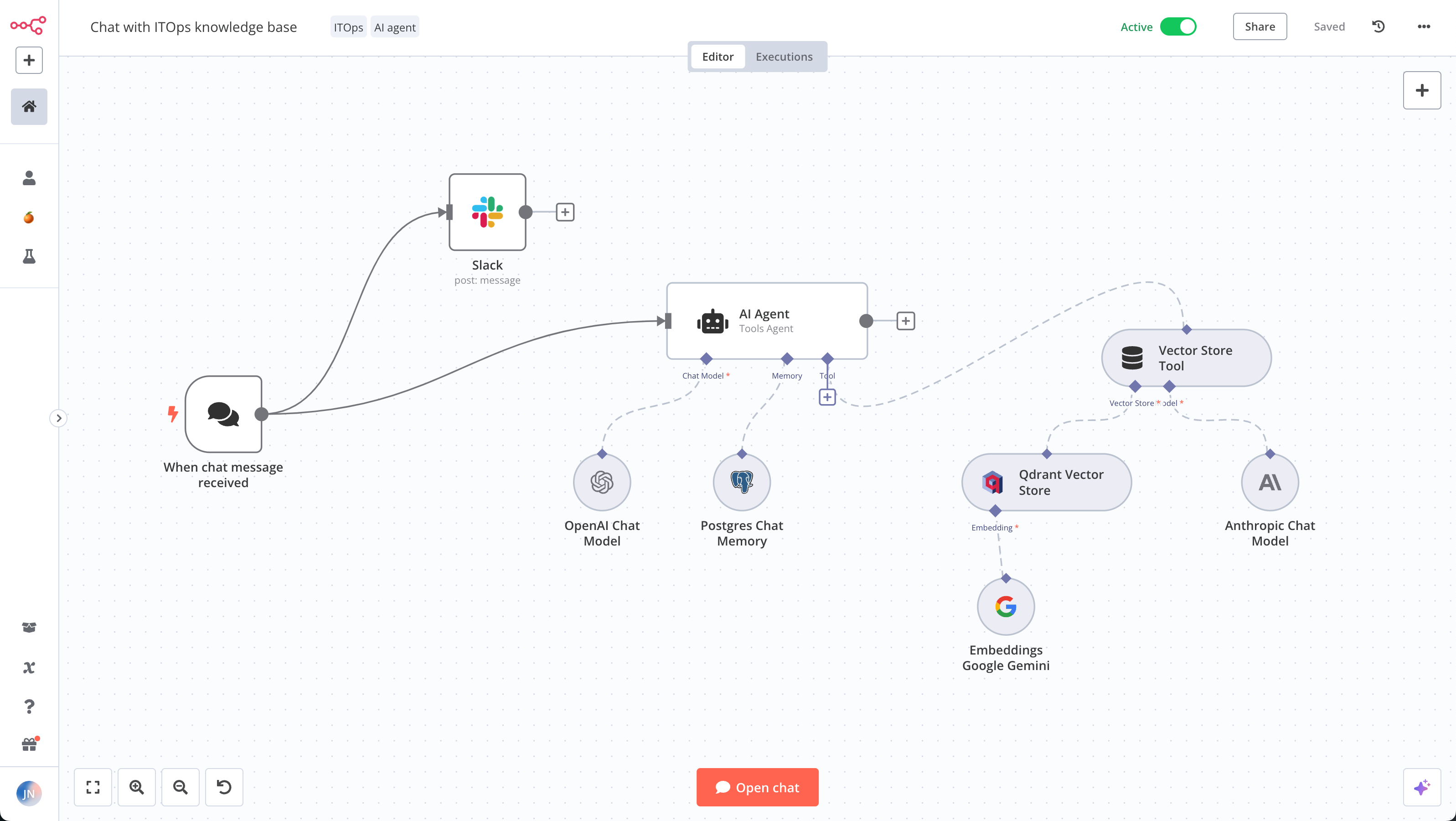
INSIDE A WORKFLOW EDITOR
WHAT CAN WE BUILD?
From one useful automation to connected operations, the right starting point is the task you want to make easier.
01 / FOLLOW-UP
Keep useful lead nurturing, email and customer follow-up connected to the stage of the relationship. An agreed event starts the sequence; replies, opt-outs and stop rules decide what happens next.
Best starting point: a follow-up your team repeats every week.
02 / VOICE + TEXT
Combine inbound AI reception, approved callback workflows and permission-based texts. Define the audience, purpose and information needed, then give the conversation a clear route back to your team.
People take over when the answer or commitment needs them.
03 / ADMIN
Route requests, create tasks, coordinate appointments and prepare routine information. A good administrative workflow removes repeated steps while leaving important approvals where they belong.
Start with a task that has a clear trigger and finish line.
04 / RECORDS + SYSTEMS
Connect the fields and events that matter across supported business tools. Agree which system is the source of truth and what happens when records disagree or a connection fails.
Integration fit is checked before implementation.
05 / CUSTOMER FOLLOW-THROUGH
Use appropriate reminders, service updates and neutral review requests after an agreed event. Review requests should not buy praise, filter out unhappy customers or manufacture feedback.
Respect channel preferences and clear stop rules.
06 / CUSTOM AI ASSISTANTS
Where a task needs more than simple rules, scope an AI assistant around permitted information and specific actions. A useful system knows its job, its limits and when to pass the work to a person.
AI where it helps. Straightforward automation where it does not.
INTEGRATION, WITHOUT THE GUESSWORK
You may already have most of the tools you need. We look at how they connect, what data should move and which actions are actually available before recommending another subscription.
That can mean a supported integration, an API or a carefully scoped automation between systems. We check account tiers, permissions, data fields and practical limitations. “Connects with everything” is not a plan.
Tools we can assess for your workflow. Availability depends on your plan, permissions and supported integrations. Logos identify products, not partnerships.

Connect supported apps

Build connected workflows

Link office and field work
START SMALL. MAKE IT USEFUL.
You do not need an AI master plan to get started. Bring us a bottleneck. We can work through whether a custom system is the sensible next step.
01
Show us where it gets slow, repetitive or easy to miss. Define the trigger, the desired result and the people involved.
02
Check the tools, access, data and limits. Agree what will be automated, what stays manual and what success should mean.
03
Test normal requests, unclear inputs and failure cases. Review the messages, records and actions before relying on the workflow.
04
Agree the handover, support and maintenance responsibilities. Expand when there is a good reason, not just because another feature exists.
AUTOMATION WITH BOUNDARIES
A clever demo is not the same as a dependable workflow. Scope the decisions, review points and fallback paths that make the system useful in a real business.
Decide which information the system may use and which records or messages it may change.
Keep unusual requests, sensitive situations and consequential decisions with the people responsible for them.
Define how failed connections, uncertain answers and exceptions are surfaced, reviewed and corrected.
HEALTHCARE ADMINISTRATION
Explore workflows for appointment requests, intake routing, reminders and administrative handoffs. Help patients and staff navigate routine coordination without turning an administrative assistant into a clinical decision-maker.
Discuss a Healthcare WorkflowAny workflow involving protected health information requires a separate review of the proposed services, agreements and controls before deployment. Vendor eligibility, required business associate agreements and the responsibilities of everyone handling the information all matter.
HIPAA is not a plug-in, and connecting an app does not make a workflow compliant. Applicable privacy requirements depend on the project and jurisdiction. Clinical decisions remain with qualified professionals.
ILLUSTRATIVE WORKFLOW · NOT A CLIENT CASE STUDY
Imagine a local service business receives a quote request while the team is on site. Here is a practical system to explore, using example steps rather than claimed client results.
The point is not to automate every conversation. It is to make sure the request reaches the right place with enough context for a useful next move.
IN
A website inquiry describes the work and service area.
CHECK
The workflow checks required details and the agreed routing rules.
DO
An appropriate acknowledgement goes out. The supported CRM receives the details and a task.
REVIEW
The customer asks for an unusual price or commitment. A person takes over with the original context.
NO MYSTERY AROUND THE BUILD
A useful scope separates the implementation from the ongoing tools and responsibilities. These details belong in the proposal, not in a surprise after launch.
The workflow, integrations, deliverables, assumptions and implementation fee. What is included, what is not and which actions need approval.
Any software, model, phone, text-message, hosting and support costs, with the usage assumptions that affect them.
Account access, ownership and licensing terms, documentation, maintenance and who handles changes when tools or processes evolve.
Start with the part of your business you want to improve. These guides explain the practical steps, limits and handoffs.
GOOD QUESTIONS
Start with repeated work that has a clear trigger and next step: responding to leads, routing calls, scheduling, updating records or following up after a job. We work with B2B and B2C businesses and scope the system around the workflow, tools and constraints involved.
No. Knowing what slows your team down is a good start. Tell us what happens today, which tools you use and what you would like to stop doing by hand. The first question is whether automation helps, not which AI model sounds most impressive.
We can review the tools and the connection you need. Compatibility depends on the available APIs, integrations, account tiers, permissions and data involved. We confirm the practical fit before committing to a particular connection or two-way sync.
Not necessarily. A chatbot can be one part of a system, but many useful workflows connect calls, messages, calendars, records and staff tasks. Some steps need AI; others are better handled with straightforward rules. Any required subscriptions should be identified in the scope.
Yes, within a properly scoped workflow. Inbound reception, requested callbacks, appointment updates and marketing outreach have different requirements. Audience, purpose, consent, identification, opt-outs and applicable calling or messaging rules must be worked through before deployment.
Those actions can be scoped where the selected phone and scheduling tools support them. The system needs clear availability rules, permitted actions and a fallback when a person is unavailable or the request is outside its scope. We do not promise that every call can be resolved automatically.
That possibility belongs in the design. Agree which outputs need review, when the system should stop or escalate, how failures are reported and who corrects them. Test unclear requests and exceptions alongside the happy path. An AI response should not be treated as infallible.
Healthcare projects are scoped individually before implementation. A proposed workflow involving protected health information depends on the selected vendors and features, required agreements, configuration and compliance review. Connecting eligible software alone does not establish that the whole workflow is compliant.
That depends on the agreed workflow. Identify the minimum information and permissions needed, the systems receiving it and the people responsible for access. Do not send passwords, API keys, patient information or customer databases through the initial inquiry form.
The answer depends on the specific providers, services, account settings and deployment. Review data flows, storage, retention, model terms and any location requirements for the proposed system before launch. There is no universal answer that applies to every AI integration.
Cost depends on the work, integrations and usage. The proposal should distinguish implementation from ongoing software and support costs, and explain account access, custom deliverables, licensed tools and ownership. We do not assume one price or one ownership arrangement fits every project.
Yes. A focused starting point makes it easier to test the fit and understand the operating requirements. Scope the first useful outcome, then decide whether another workflow is worth connecting. Maintenance and support arrangements should be agreed as the system grows.
LET’S MAKE WORK FLOW
Tell us where the work gets stuck. You bring the bottleneck. We will help work through the workflow, the tools and whether a custom system makes sense.
Make My Tools Work TogetherStart with a description of the task. No sensitive records or login details needed.



