01 / CUSTOMER COPY
Printable roofing estimate PDF
Business and project details, scope, line items, total, assumptions and exclusions. Space for your existing payment and warranty wording.
Printable PDF · blank template + fictional example

Download a free roofing estimate template in Excel or printable PDF. Set out the scope, materials, labour and total in a quote your customer can follow.
Free basic downloads. No account required. Excel workbook + four-page printable PDF.
Explore the roofing estimate example ↓THE TEMPLATE, AT A GLANCE
Use the editable workbook for your selling prices and the printable PDF for a customer-facing estimate. You supply the measurements, quantities and tax choices.
01 / CUSTOMER COPY
Business and project details, scope, line items, total, assumptions and exclusions. Space for your existing payment and warranty wording.
Printable PDF · blank template + fictional example
02 / WORKING FILE
Enter quantities, units, selling prices and taxable flags. Amber cells are inputs; gray cells calculate. Four spare line items are included.
Editable .xlsx · formulas checked in LibreOffice
03 / WORKED EXAMPLE
Follow a fictional replacement job from roof surface area to itemised estimate. Use the example to understand the layout, then enter your own figures.
See the example ↓A ROOFING ESTIMATE EXAMPLE
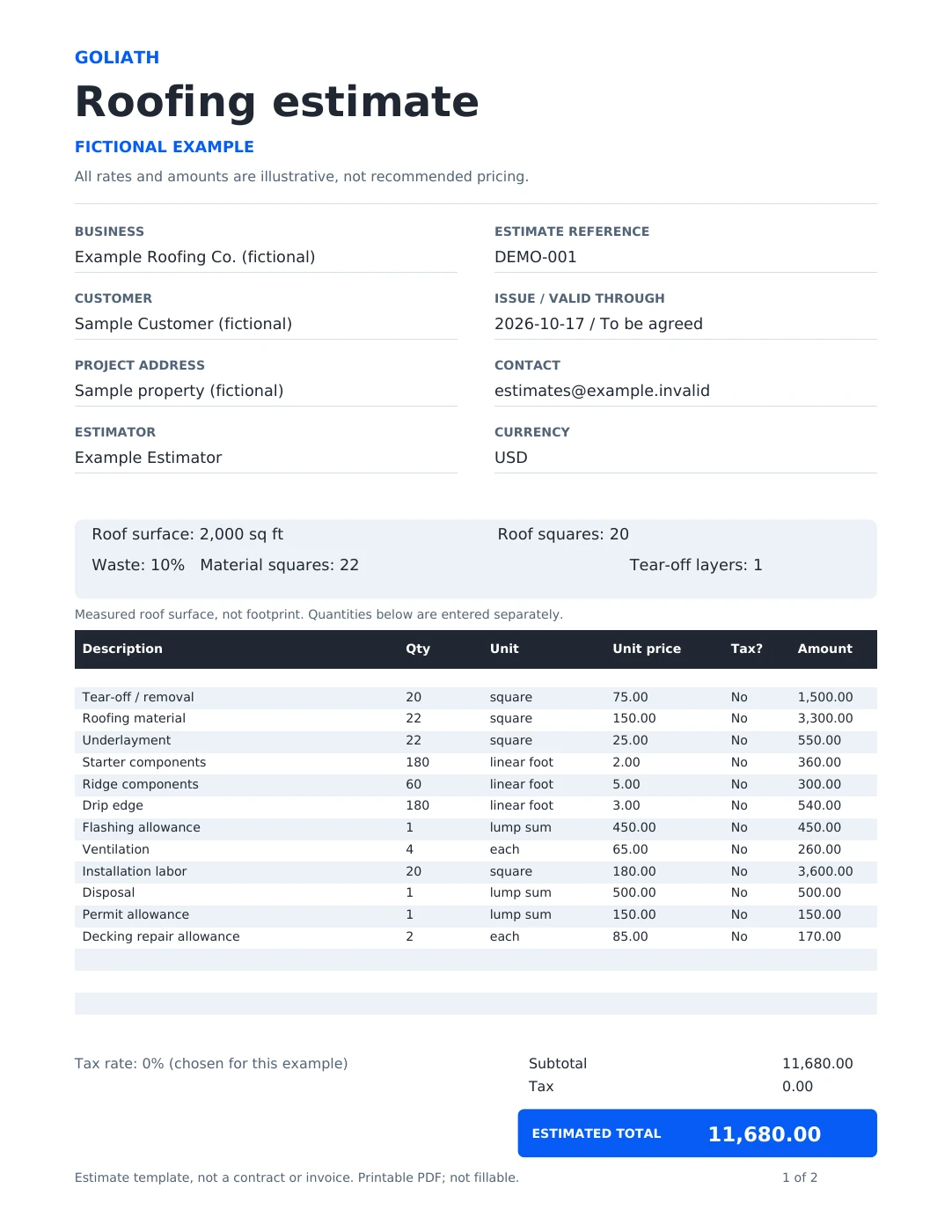
This fictional roof replacement includes one layer of tear-off, roofing material, components, labour and disposal. Permit and decking repairs are visible allowances included in the total.
2,000 sq ft
Measured roof surface area
20 roof squares
Surface area ÷ 100
22 material squares
20 squares + selected 10% waste
The 10% waste figure is an example input, not a recommended allowance. Labour and removal use 20 squares; waste is not added to them.
Example exclusions: structural repairs, gutters and work beyond the stated scope. Any decking beyond the two-sheet allowance would need review and a revised price.
Fictional business, customer and project. Dollar amounts are illustrative, not recommended pricing. This is a scope-and-price example, not a construction specification or professionally reviewed estimate.
| Work / material | Quantity × selling price | Amount |
|---|---|---|
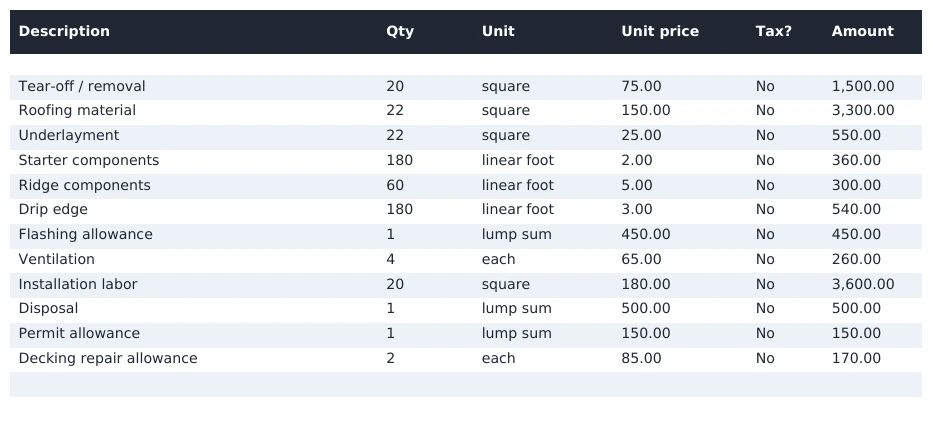
| Tear-off / removal | 20 squares × $75 | $1,500 |
| Roofing material | 22 squares × $150 | $3,300 |
| Underlayment | 22 squares × $25 | $550 |
| Starter components | 180 linear ft × $2 | $360 |
| Ridge components | 60 linear ft × $5 | $300 |
| Drip edge | 180 linear ft × $3 | $540 |
| Flashing allowance | 1 lump sum × $450 | $450 |
| Ventilation | 4 each × $65 | $260 |
| Installation labour | 20 squares × $180 | $3,600 |
| Disposal | 1 lump sum × $500 | $500 |
| Permit allowance | 1 lump sum × $150 | $150 |
| Decking repair allowance | 2 each × $85 | $170 |
| Subtotal | $11,680 | |
| Example tax · explicitly selected 0% | $0 | |
| Estimated total | $11,680 | |
Amounts are illustrative, not recommended pricing. Row totals are quantity × selling price; allowances are included.
FROM BLANK FILE TO CUSTOMER QUOTE
Open the workbook’s Instructions tab first. Use amber input cells and leave the gray formulas intact; they are visually marked, but not locked. The images below come from the actual printable PDF.
01
Add your business, customer and project details in rows 5–12. Set the estimate reference, issue date, estimator and currency.
BUSINESS → CUSTOMER → PROJECT
02
Enter surface area, waste and layer count in B14:B16. Enter line quantities separately in rows 20–35, with your units and selling prices.
QUANTITY × UNIT PRICE = AMOUNT
03
Choose Yes or No for each taxable flag and enter your tax rate in B39, including an explicit 0% where appropriate. CHECK means an input needs attention.
SCOPE → ALLOWANCES → TOTAL
04
Review total F41 and the scope, assumptions and exclusions. Keep the workbook; use the supplied printable PDF or check your own print area before exporting.
REVIEW → SAVE → SEND

FEWER UNANSWERED QUESTIONS
A useful roofing quote makes it clear what the customer is paying for, what needs confirmation and what happens next.
An estimate describes proposed scope and pricing. An invoice requests payment. This resource is a layout aid; it does not supply contract terms or legal acceptance wording.
OPTIONAL BONUS · AFTER THE QUOTE
A simple tracker and ready-to-edit messages can help keep the next conversation from disappearing into a busy week.
Review before sending. Honour channel permissions and opt-outs; stop generic follow-up after a reply or closed quote.
INCLUDED TRACKER · MANUAL WORKFLOW
QUOTE DETAILS
Reference, customer and sent date
REVIEW & STATUS
Owner, status and next review date
STOP RULES
Reply, hold, closure and opt-out checks
The workbook organises quote status, ownership and review dates. It does not send messages or detect customer replies.
OPTIONAL FOLLOW-UP PACK
Get the message bank and quote tracker together. The basic estimate template stays free without signup.
BEFORE AND AFTER THE QUOTE
A clear estimate is one step in the customer journey. These guides help you check the enquiry path, plan a website and follow up after you send a quote.
Test calls, quote requests and the handoff to your team before you send more traffic to the site.
Roofing website checklist →Compare pages, project photos, integrations and ongoing support when reviewing a website proposal.
What affects roofing website cost →Use email and text examples with clear reply ownership, permission checks and stop rules.
Estimate follow-up guide →CONNECT THE NEXT STEP
We can help connect your website, lead forms and follow-up process, so your team spends less time moving information around and more time talking to customers.
See our integration and automation services →BEFORE YOU START
Yes. The Excel workbook and printable PDF are free to download above without an account. The extra follow-up pack is a separate optional offer.
You can edit your business details and line-item descriptions, quantities, units and prices. Four spare rows are included. Formula cells are gray, but unlocked—avoid overwriting them. Inserting additional rows needs a calculation check.
The download is an Excel .xlsx workbook. Baseline, tax and missing-input calculations have been checked in Microsoft Excel. A Google Sheets version and native copy link are not provided or tested.
No. You supply the measurements, waste allowance, quantities and selling prices. Roof squares are surface area divided by 100; roof surface area is not the building footprint. Verify local tax treatment yourself.
The supplied example covers a roof replacement. A separate repair template has not been tested. Adapt the scope and quantities carefully before using it for other work.
The PDF is printable, not fillable. It contains four pages: two for the blank estimate and two for the fictional completed example. Use the Excel file to edit the figures.
It is a proposed estimate layout. It does not include a contract, acceptance block or universal warranty terms. Use your own approved documentation for those purposes.
No. The tracker and message bank work manually. The guide includes an optional Zapier internal-reminder recipe, which has been source-checked but not live-tested. It does not send customer messages.
A CLEARER PLACE TO START
Download the editable Excel workbook or the printable PDF. Start with the fictional example, then enter your own scope, measurements and prices.
Return to the completed example ↑


